
Get support

Abstract Blue wave with support headset icon

Need immediate assistance with your connectivity?

The fastest way to reach our support team is by using Online Chat below. Also feel free to send an email to support@mrnet.us or call us at (845) 666-0696.

Our engineers are standing by to help you troubleshoot and resolve issues quickly.

Standard Support:

9:00 AM - 5:00 PM (Monday - Friday, EST)

After-Hours Premium Support:

7:00 AM - 11:59 PM (Monday - Sunday, EST)

Response time (<1 hour)

9:00 AM - 5:00 PM (Monday - Friday, EST)

Response time: (<24 hours)

5:01 PM - 8:59 AM (Friday - Monday, EST)

Business Hours:

9:00 AM - 5:00 PM (Monday - Friday, EST)

Standard Support:

9:00 AM - 5:00 PM (Monday - Friday, EST)

After-Hours Premium Support:

7:00 AM - 11:59 PM (Monday - Sunday, EST)

Response time (<1 hour)

9:00 AM - 5:00 PM (Monday - Friday, EST)

Response time: (<24 hours)

5:01 PM - 8:59 AM (Friday - Monday, EST)

Business Hours:

9:00 AM - 5:00 PM (Monday - Friday, EST)

Standard Support:

9:00 AM - 5:00 PM (Monday - Friday, EST)

After-Hours Premium Support:

7:00 AM - 11:59 PM (Monday - Sunday, EST)

Response time (<1 hour)

9:00 AM - 5:00 PM (Monday - Friday, EST)

Response time: (<24 hours)

5:01 PM - 8:59 AM (Friday - Monday, EST)

Business Hours:

9:00 AM - 5:00 PM (Monday - Friday, EST)

Setup guide

Setup Guide (Model: MR 006 Plus)

1. Unpack the Box

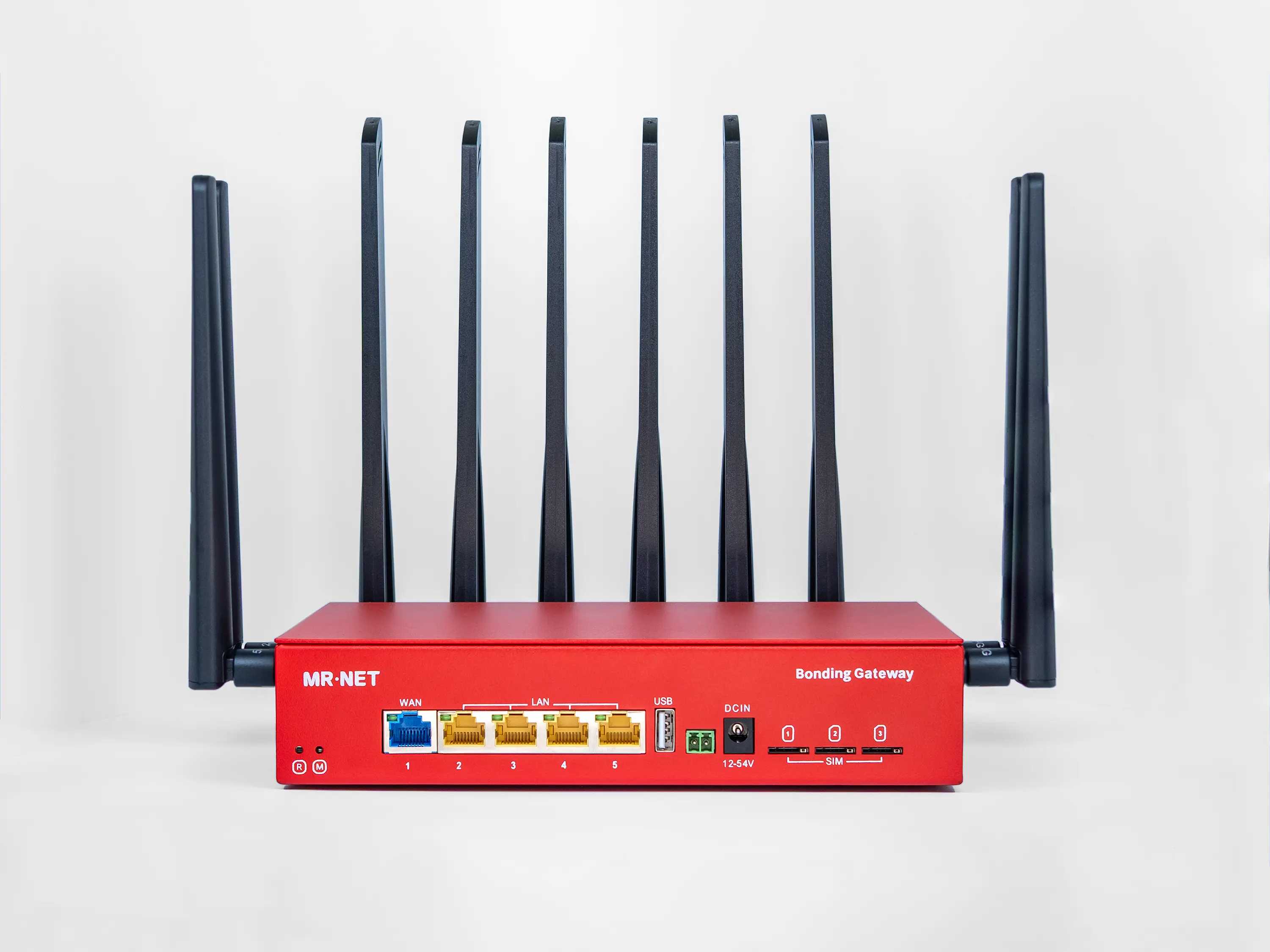
Open the box and remove the Bonding Gateway (Device) and all other items from the package contents (antennas, DC adapter, RJ45 cable).

1. Unpack the Box

Open the box and remove the Bonding Gateway (Device) and all other items from the package contents (antennas, DC adapter, RJ45 cable).

1. Unpack the Box

Open the box and remove the Bonding Gateway (Device) and all other items from the package contents (antennas, DC adapter, RJ45 cable).

2. Attach the 4G/5G Antennas

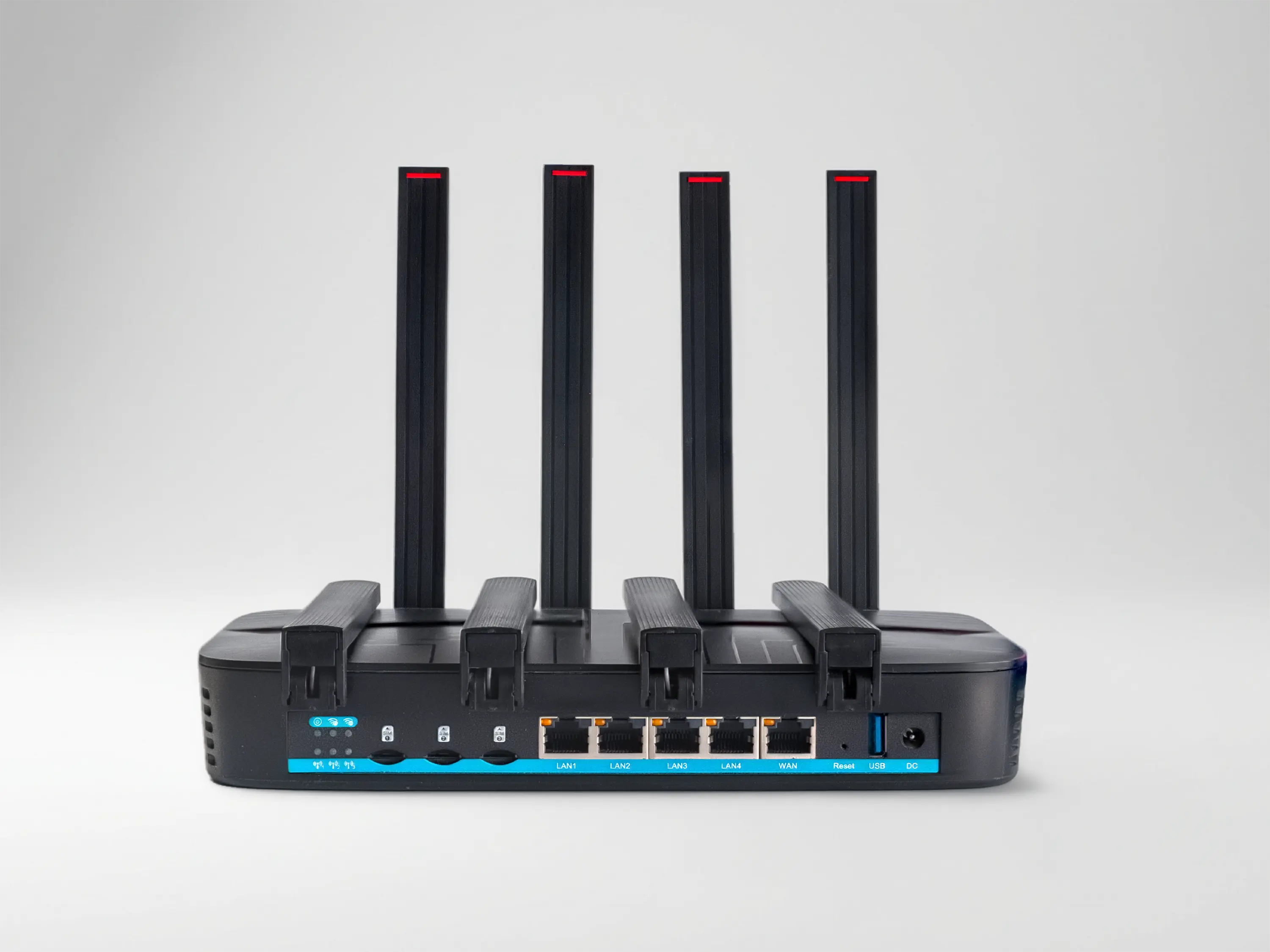
Gently screw all six 4G/5G antennas into the SMA ports on the back of the Bonding Gateway. Ensure they are threaded straight and secure.

2. Attach the 4G/5G Antennas

Gently screw all six 4G/5G antennas into the SMA ports on the back of the Bonding Gateway. Ensure they are threaded straight and secure.

2. Attach the 4G/5G Antennas

Gently screw all six 4G/5G antennas into the SMA ports on the back of the Bonding Gateway. Ensure they are threaded straight and secure.

3. Attach the Wi-Fi Antennas

Screw the four Wi-Fi antennas into the designated ports, two on the left side and two on the right side of the Bonding Gateway.

3. Attach the Wi-Fi Antennas

Screw the four Wi-Fi antennas into the designated ports, two on the left side and two on the right side of the Bonding Gateway.

3. Attach the Wi-Fi Antennas

Screw the four Wi-Fi antennas into the designated ports, two on the left side and two on the right side of the Bonding Gateway.

4. Adjust the Antennas

Position each antenna at a 90-degree angle for optimal signal reception.

4. Adjust the Antennas

Position each antenna at a 90-degree angle for optimal signal reception.

4. Adjust the Antennas

Position each antenna at a 90-degree angle for optimal signal reception.

5. Connect the Power Supply to the Device

Insert the power supply adapter into the DC connector on the Bonding Gateway. Do not plug it into an electrical outlet yet.

5. Connect the Power Supply to the Device

Insert the power supply adapter into the DC connector on the Bonding Gateway. Do not plug it into an electrical outlet yet.

5. Connect the Power Supply to the Device

Insert the power supply adapter into the DC connector on the Bonding Gateway. Do not plug it into an electrical outlet yet.

6. Place the Device in the Best Signal Area

Position the Bonding Gateway where cellular signal is strongest, such as near a window or elevated spot. Avoid metal barriers or obstructions.

6. Place the Device in the Best Signal Area

Position the Bonding Gateway where cellular signal is strongest, such as near a window or elevated spot. Avoid metal barriers or obstructions.

6. Place the Device in the Best Signal Area

Position the Bonding Gateway where cellular signal is strongest, such as near a window or elevated spot. Avoid metal barriers or obstructions.

7. Power On the Device

Plug the DC power adapter into a 110V electrical outlet. The device will automatically turn on, and a green light will appear, indicating the unit is powered.

7. Power On the Device

Plug the DC power adapter into a 110V electrical outlet. The device will automatically turn on, and a green light will appear, indicating the unit is powered.

7. Power On the Device

Plug the DC power adapter into a 110V electrical outlet. The device will automatically turn on, and a green light will appear, indicating the unit is powered.

8. Wait for Connection

Allow 2-3 minutes for setup. The mode light will turn solid blue when your internet connection is established.

8. Wait for Connection

Allow 2-3 minutes for setup. The mode light will turn solid blue when your internet connection is established.

8. Wait for Connection

Allow 2-3 minutes for setup. The mode light will turn solid blue when your internet connection is established.

9. Connect Your Equipment

Link your equipment to the Bonding Gateway via LAN ports or Wi-Fi.

9. Connect Your Equipment

Link your equipment to the Bonding Gateway via LAN ports or Wi-Fi.

9. Connect Your Equipment

Link your equipment to the Bonding Gateway via LAN ports or Wi-Fi.

10. You Are Ready

If you encounter any issues, feel free to reach out via our website's online chat, or email.

10. You Are Ready

If you encounter any issues, feel free to reach out via our website's online chat, or email.

10. You Are Ready

If you encounter any issues, feel free to reach out via our website's online chat, or email.

Troubleshooting

00

00

00

Common Issues

How to Solve Common Issues

How to Solve Common Issues

Solutions and tips

01

01

01

Use certified power adapters only

Use certified power adapters only

Use certified power adapters only

Avoid non-certified power supply adapters, as they could damage the device. Use only original adapters. Contact us if you are unsure which power supply is suitable for your equipment.

02

02

02

Compliance with Equipment

Compliance with Equipment

Compliance with Equipment

The device must be used only in strict compliance with client equipment operating, energy, and safety requirements.

03

03

03

Don't Mix 4G/5G and Wi-Fi Antennas

Don't Mix 4G/5G and Wi-Fi Antennas

Don't Mix 4G/5G and Wi-Fi Antennas

Do not confuse 4G/5G antennas with 2.4 GHz & 5 GHz Wi-Fi antennas. Each antenna has engravings indicating its type.

04

04

04

Avoid Metal Obstructions and High-Power Appliances

Avoid Metal Obstructions and High-Power Appliances

Avoid Metal Obstructions and High-Power Appliances

Do not place the equipment near metal constructions, as they can block cellular signals. Make sure to place the unit at least several feet away from high-power appliances.

05

05

05

Prefer Wired LAN Connection for Best Performance

Prefer Wired LAN Connection for Best Performance

Prefer Wired LAN Connection for Best Performance

Use wired LAN connections for your equipment whenever possible. Wi-Fi is an option but inherently less reliable, especially in crowded areas.

06

06

06

Distinguish WAN and LAN Ports

Distinguish WAN and LAN Ports

Distinguish WAN and LAN Ports

Don't confuse WAN and LAN ports. The WAN port is for adding optional extra internet sources from other providers to the bonded connection. LAN ports are for connection your equipment which needs internet access

07

07

07

Avoid Misplacing SIM Cards

Avoid Misplacing SIM Cards

Avoid Misplacing SIM Cards

Do not use pre-installed SIM cards in third-party equipment. If you want to use your own SIM cards, contact our support team to update device settings for them to work correctly.

08

08

08

Protect from the Elements

Protect from the Elements

Protect from the Elements

The device's enclosure is made of a durable metal. IP50 Class of the protection. Protected from limited dust ingress. No liquid protection.

FAQ

What is MR·NET?

MR·NET is a managed business internet service that delivers ultra-reliable, zero-downtime connectivity through patented cellular bonding technology. We aggregate multiple independent internet sources (cellular + wired/satellite) into one robust connection, perfect for live video streaming, public transportation Wi-Fi, IoT deployments, retail failover, trade shows, and emergency services across the US and Canada.

How does MR·NET's internet bonding service work?

Our plug-and-play solution combines four key components: 1) Cellular bonding gateway - Preconfigured hardware that bonds up to 6 independent internet connections 2) Enterprise data plans - Managed SIM cards from Verizon, T-Mobile, and AT&T 3) Cloud bonding protocol - Self-healing technology that automatically reroutes traffic if one connection fails 4) Proactive live support with US-based team - Proactive monitoring and personalized assistance Setup takes less than a minute - just plug in and connect.

What are the benefits of cellular bonding technology?

Cellular bonding creates an ultra-reliable internet connection that's up to 300% more stable than single-source connections. Key benefits: 1) Zero downtime - Automatic failover if one connection drops 2) Increased bandwidth - Aggregate speeds from multiple carriers 3) Load balancing - Optimizes traffic across all connections 4) Unbeatable coverage - Works where single-carrier solutions fail Think of it as operational insurance for your mission-critical connectivity.

How can I get a MR·NET bonding router?

We offer flexible options to fit your needs: - Rental plans - Monthly or annual subscriptions with included hardware - Purchase option - Buy the gateway outright and pay only for service Explore solutions by industry or contact sales for a custom quote.

What's included in the service fee?

Your monthly or annual service fee includes: 1) Access to our cloud bonding infrastructure 2) Web management portal for network monitoring and control 3) Preconfigured bonding gateway (rental plans) 4) Proactive live support with US-based team - Proactive monitoring and personalized assistance Data usage is billed separately based on your chosen plan.

How does data usage pricing work?

Each MR·NET gateway includes 3 managed SIM cards from top US carriers (Verizon, T-Mobile, AT&T). Data usage through these SIM cards is billed based on your selected plan: - Pay-per-use - Flexible pricing for variable usage - High-capacity plans - Fixed monthly data allowances for predictable costs View detailed pricing on our pricing page.

What data plans are available?

We offer two plan types: - Pay-per-use - Ideal for seasonal or occasional connectivity needs - High-capacity plans - Best for continuous operations like live streaming or fleet Wi-Fi All plans include enterprise-grade data from Verizon, T-Mobile, and AT&T with priority network access.

Can I use my own SIM cards?

Yes, our bonding gateway supports third-party SIM cards. However: 1) You'll be responsible for managing your own carrier plans 2) MR·NET cannot guarantee connection quality or provide bonding optimization for non-managed SIMs 3) You'll still benefit from our bonding technology and cloud infrastructure For best results and full support, we recommend using MR·NET's managed enterprise data plans.

Does MR·NET work internationally?

MR·NET bonding routers work out-of-the-box in the US and Canada. International deployment options are available for other regions. Contact us at sales@mrnet.us to discuss global connectivity requirements.

What is your cancellation and return policy?

We offer flexible terms with no long-term commitment: 1) 14-day money-back guarantee for first-time customers 2) Cancel anytime on rental plans - just return the equipment 3) Suspend and resume service on purchased gateways whenever needed 4) Service remains active through the end of your current billing period We're confident you'll experience the reliability difference, but if not, canceling is hassle-free.

What is internet bonding and how does it work?

Internet bonding (also called link aggregation or channel bonding) is a technology that combines multiple internet connections into a single, unified connection. Unlike traditional failover systems that switch to a backup only when the primary fails, bonding actively uses all connections simultaneously. MR·NET's patented bonding protocol works at the packet level - splitting your data across multiple cellular and wired connections, then reassembling it in the cloud. This creates a faster, more reliable connection that automatically adapts if one source degrades or fails. The result: zero downtime and up to 300% better reliability than single-connection solutions.

How is MR·NET different from a traditional ISP or mobile hotspot?

Unlike traditional ISPs and mobile hotspots that rely on a single connection point: MR·NET advantages: 1) Multi-carrier redundancy - Bonds Verizon, T-Mobile, and AT&T simultaneously (no single point of failure) 2) Automatic failover - Seamless, instant recovery without dropped connections 3) Managed service - We handle everything: hardware, data plans, monitoring, and support 4) Enterprise-grade reliability - Built for mission-critical applications, not casual browsing 5) Centralized management - Control distributed networks from one portal Traditional ISPs offer a single wired connection. Mobile hotspots use one carrier at a time. MR·NET bonds them all together for ultra-reliable connectivity you can't get anywhere else.

What industries and use cases is MR·NET designed for?

MR·NET serves businesses that can't afford internet downtime: 1) Live video streaming - Broadcast events, news, and sports without buffering or dropped streams 2) Trade shows & events - Temporary high-bandwidth internet for exhibitors and vendors 3) Public transportation - Reliable Wi-Fi for buses, trains, and fleet vehicles 4) IoT & industrial - Always-on connectivity for sensors, surveillance, and remote monitoring 5) Retail & hospitality - Failover protection for POS systems and guest Wi-Fi across multiple locations 6) Emergency services - Portable, resilient connectivity for first responders and disaster recovery 7) Construction & remote sites - Internet access where wired connections aren't available If your operations depend on consistent internet access - whether stationary, mobile, or temporary - MR·NET is built for you.
What is MR·NET?

MR·NET is a managed business internet service that delivers ultra-reliable, zero-downtime connectivity through patented cellular bonding technology. We aggregate multiple independent internet sources (cellular + wired/satellite) into one robust connection, perfect for live video streaming, public transportation Wi-Fi, IoT deployments, retail failover, trade shows, and emergency services across the US and Canada.

How does MR·NET's internet bonding service work?

Our plug-and-play solution combines four key components: 1) Cellular bonding gateway - Preconfigured hardware that bonds up to 6 independent internet connections 2) Enterprise data plans - Managed SIM cards from Verizon, T-Mobile, and AT&T 3) Cloud bonding protocol - Self-healing technology that automatically reroutes traffic if one connection fails 4) Proactive live support with US-based team - Proactive monitoring and personalized assistance Setup takes less than a minute - just plug in and connect.

What are the benefits of cellular bonding technology?

Cellular bonding creates an ultra-reliable internet connection that's up to 300% more stable than single-source connections. Key benefits: 1) Zero downtime - Automatic failover if one connection drops 2) Increased bandwidth - Aggregate speeds from multiple carriers 3) Load balancing - Optimizes traffic across all connections 4) Unbeatable coverage - Works where single-carrier solutions fail Think of it as operational insurance for your mission-critical connectivity.

How can I get a MR·NET bonding router?

We offer flexible options to fit your needs: - Rental plans - Monthly or annual subscriptions with included hardware - Purchase option - Buy the gateway outright and pay only for service Explore solutions by industry or contact sales for a custom quote.

What's included in the service fee?

Your monthly or annual service fee includes: 1) Access to our cloud bonding infrastructure 2) Web management portal for network monitoring and control 3) Preconfigured bonding gateway (rental plans) 4) Proactive live support with US-based team - Proactive monitoring and personalized assistance Data usage is billed separately based on your chosen plan.

How does data usage pricing work?

Each MR·NET gateway includes 3 managed SIM cards from top US carriers (Verizon, T-Mobile, AT&T). Data usage through these SIM cards is billed based on your selected plan: - Pay-per-use - Flexible pricing for variable usage - High-capacity plans - Fixed monthly data allowances for predictable costs View detailed pricing on our pricing page.

What data plans are available?

We offer two plan types: - Pay-per-use - Ideal for seasonal or occasional connectivity needs - High-capacity plans - Best for continuous operations like live streaming or fleet Wi-Fi All plans include enterprise-grade data from Verizon, T-Mobile, and AT&T with priority network access.

Can I use my own SIM cards?

Yes, our bonding gateway supports third-party SIM cards. However: 1) You'll be responsible for managing your own carrier plans 2) MR·NET cannot guarantee connection quality or provide bonding optimization for non-managed SIMs 3) You'll still benefit from our bonding technology and cloud infrastructure For best results and full support, we recommend using MR·NET's managed enterprise data plans.

Does MR·NET work internationally?

MR·NET bonding routers work out-of-the-box in the US and Canada. International deployment options are available for other regions. Contact us at sales@mrnet.us to discuss global connectivity requirements.

What is your cancellation and return policy?

We offer flexible terms with no long-term commitment: 1) 14-day money-back guarantee for first-time customers 2) Cancel anytime on rental plans - just return the equipment 3) Suspend and resume service on purchased gateways whenever needed 4) Service remains active through the end of your current billing period We're confident you'll experience the reliability difference, but if not, canceling is hassle-free.

What is internet bonding and how does it work?

Internet bonding (also called link aggregation or channel bonding) is a technology that combines multiple internet connections into a single, unified connection. Unlike traditional failover systems that switch to a backup only when the primary fails, bonding actively uses all connections simultaneously. MR·NET's patented bonding protocol works at the packet level - splitting your data across multiple cellular and wired connections, then reassembling it in the cloud. This creates a faster, more reliable connection that automatically adapts if one source degrades or fails. The result: zero downtime and up to 300% better reliability than single-connection solutions.

How is MR·NET different from a traditional ISP or mobile hotspot?

Unlike traditional ISPs and mobile hotspots that rely on a single connection point: MR·NET advantages: 1) Multi-carrier redundancy - Bonds Verizon, T-Mobile, and AT&T simultaneously (no single point of failure) 2) Automatic failover - Seamless, instant recovery without dropped connections 3) Managed service - We handle everything: hardware, data plans, monitoring, and support 4) Enterprise-grade reliability - Built for mission-critical applications, not casual browsing 5) Centralized management - Control distributed networks from one portal Traditional ISPs offer a single wired connection. Mobile hotspots use one carrier at a time. MR·NET bonds them all together for ultra-reliable connectivity you can't get anywhere else.

What industries and use cases is MR·NET designed for?

MR·NET serves businesses that can't afford internet downtime: 1) Live video streaming - Broadcast events, news, and sports without buffering or dropped streams 2) Trade shows & events - Temporary high-bandwidth internet for exhibitors and vendors 3) Public transportation - Reliable Wi-Fi for buses, trains, and fleet vehicles 4) IoT & industrial - Always-on connectivity for sensors, surveillance, and remote monitoring 5) Retail & hospitality - Failover protection for POS systems and guest Wi-Fi across multiple locations 6) Emergency services - Portable, resilient connectivity for first responders and disaster recovery 7) Construction & remote sites - Internet access where wired connections aren't available If your operations depend on consistent internet access - whether stationary, mobile, or temporary - MR·NET is built for you.
What is MR·NET?

MR·NET is a managed business internet service that delivers ultra-reliable, zero-downtime connectivity through patented cellular bonding technology. We aggregate multiple independent internet sources (cellular + wired/satellite) into one robust connection, perfect for live video streaming, public transportation Wi-Fi, IoT deployments, retail failover, trade shows, and emergency services across the US and Canada.

How does MR·NET's internet bonding service work?

Our plug-and-play solution combines four key components: 1) Cellular bonding gateway - Preconfigured hardware that bonds up to 6 independent internet connections 2) Enterprise data plans - Managed SIM cards from Verizon, T-Mobile, and AT&T 3) Cloud bonding protocol - Self-healing technology that automatically reroutes traffic if one connection fails 4) Proactive live support with US-based team - Proactive monitoring and personalized assistance Setup takes less than a minute - just plug in and connect.

What are the benefits of cellular bonding technology?

Cellular bonding creates an ultra-reliable internet connection that's up to 300% more stable than single-source connections. Key benefits: 1) Zero downtime - Automatic failover if one connection drops 2) Increased bandwidth - Aggregate speeds from multiple carriers 3) Load balancing - Optimizes traffic across all connections 4) Unbeatable coverage - Works where single-carrier solutions fail Think of it as operational insurance for your mission-critical connectivity.

How can I get a MR·NET bonding router?

We offer flexible options to fit your needs: - Rental plans - Monthly or annual subscriptions with included hardware - Purchase option - Buy the gateway outright and pay only for service Explore solutions by industry or contact sales for a custom quote.

What's included in the service fee?

Your monthly or annual service fee includes: 1) Access to our cloud bonding infrastructure 2) Web management portal for network monitoring and control 3) Preconfigured bonding gateway (rental plans) 4) Proactive live support with US-based team - Proactive monitoring and personalized assistance Data usage is billed separately based on your chosen plan.

How does data usage pricing work?

Each MR·NET gateway includes 3 managed SIM cards from top US carriers (Verizon, T-Mobile, AT&T). Data usage through these SIM cards is billed based on your selected plan: - Pay-per-use - Flexible pricing for variable usage - High-capacity plans - Fixed monthly data allowances for predictable costs View detailed pricing on our pricing page.

What data plans are available?

We offer two plan types: - Pay-per-use - Ideal for seasonal or occasional connectivity needs - High-capacity plans - Best for continuous operations like live streaming or fleet Wi-Fi All plans include enterprise-grade data from Verizon, T-Mobile, and AT&T with priority network access.

Can I use my own SIM cards?

Yes, our bonding gateway supports third-party SIM cards. However: 1) You'll be responsible for managing your own carrier plans 2) MR·NET cannot guarantee connection quality or provide bonding optimization for non-managed SIMs 3) You'll still benefit from our bonding technology and cloud infrastructure For best results and full support, we recommend using MR·NET's managed enterprise data plans.

Does MR·NET work internationally?

MR·NET bonding routers work out-of-the-box in the US and Canada. International deployment options are available for other regions. Contact us at sales@mrnet.us to discuss global connectivity requirements.

What is your cancellation and return policy?

We offer flexible terms with no long-term commitment: 1) 14-day money-back guarantee for first-time customers 2) Cancel anytime on rental plans - just return the equipment 3) Suspend and resume service on purchased gateways whenever needed 4) Service remains active through the end of your current billing period We're confident you'll experience the reliability difference, but if not, canceling is hassle-free.

What is internet bonding and how does it work?

Internet bonding (also called link aggregation or channel bonding) is a technology that combines multiple internet connections into a single, unified connection. Unlike traditional failover systems that switch to a backup only when the primary fails, bonding actively uses all connections simultaneously. MR·NET's patented bonding protocol works at the packet level - splitting your data across multiple cellular and wired connections, then reassembling it in the cloud. This creates a faster, more reliable connection that automatically adapts if one source degrades or fails. The result: zero downtime and up to 300% better reliability than single-connection solutions.

How is MR·NET different from a traditional ISP or mobile hotspot?

Unlike traditional ISPs and mobile hotspots that rely on a single connection point: MR·NET advantages: 1) Multi-carrier redundancy - Bonds Verizon, T-Mobile, and AT&T simultaneously (no single point of failure) 2) Automatic failover - Seamless, instant recovery without dropped connections 3) Managed service - We handle everything: hardware, data plans, monitoring, and support 4) Enterprise-grade reliability - Built for mission-critical applications, not casual browsing 5) Centralized management - Control distributed networks from one portal Traditional ISPs offer a single wired connection. Mobile hotspots use one carrier at a time. MR·NET bonds them all together for ultra-reliable connectivity you can't get anywhere else.

What industries and use cases is MR·NET designed for?

MR·NET serves businesses that can't afford internet downtime: 1) Live video streaming - Broadcast events, news, and sports without buffering or dropped streams 2) Trade shows & events - Temporary high-bandwidth internet for exhibitors and vendors 3) Public transportation - Reliable Wi-Fi for buses, trains, and fleet vehicles 4) IoT & industrial - Always-on connectivity for sensors, surveillance, and remote monitoring 5) Retail & hospitality - Failover protection for POS systems and guest Wi-Fi across multiple locations 6) Emergency services - Portable, resilient connectivity for first responders and disaster recovery 7) Construction & remote sites - Internet access where wired connections aren't available If your operations depend on consistent internet access - whether stationary, mobile, or temporary - MR·NET is built for you.
Still have questions?

Still have questions?